Google Maps Korea doesn’t work quite the way most international travelers expect.
For most international travelers, Google Maps is an essential travel tool. Whether you’re exploring New York, Paris, Tokyo, or London, it’s usually the easiest way to find directions and navigate unfamiliar places.
But in South Korea, things work a little differently.
Many visitors arrive expecting Google Maps to function normally, only to discover that walking directions are limited, driving routes can be unreliable, and some location information may be incomplete.
The good news? South Korea has its own world-class navigation apps that work far better for getting around the country.
Once you know which apps to use, navigating Korea becomes surprisingly easy, whether you’re exploring the streets of Seoul, visiting Busan, or taking a road trip around Jeju Island.
🗺️ Why Doesn’t Google Maps Work Properly in South Korea?
Many visitors assume that Google Maps is broken in Korea.
In reality, the situation is a bit more complicated.
South Korea has strict regulations regarding high-resolution mapping data. Because of national security concerns, detailed geographic information cannot be freely stored on overseas servers unless certain sensitive locations are modified or blurred.
Google operates its mapping services through global servers located outside South Korea and has historically not met some of these localization requirements.
As a result, Google Maps does not have access to the same detailed map data used by Korean navigation companies.
This is why:
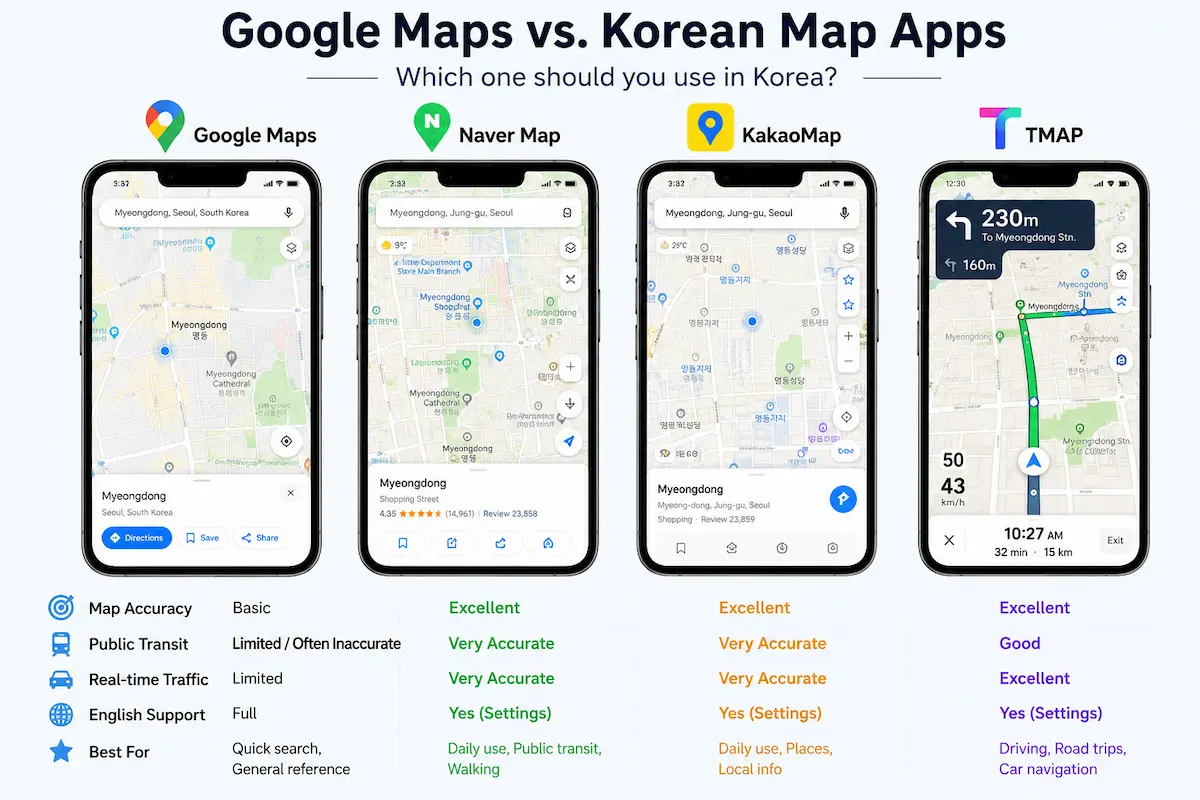
❌ Walking directions are often unavailable
❌ Driving navigation may not work correctly
❌ Some locations can be outdated or incomplete
❌ Real-time traffic information is limited
Meanwhile, Korean companies such as Naver Map and KakaoMap maintain local servers and comply with domestic regulations, giving them access to far more accurate and up-to-date mapping data.
The good news is that once you start using Korea’s local navigation apps, getting around the country becomes surprisingly easy.
📊 Quick Comparison: Google Maps vs Korean Navigation Apps
🇰🇷 Essential Korean Map Apps Every Foreigner Should Download
Before arriving in Korea, it’s a good idea to download a few local navigation apps. Since Google Maps has limited functionality, most residents and frequent travelers rely on Korean map apps instead.
The three apps below cover almost everything you’ll need, from walking directions and public transportation to driving and road trips.
| App | Best For | Recommended For |
|---|---|---|
| Naver Map (네이버 지도) | Walking directions, subway navigation, restaurant searches, shopping areas | First-time visitors and everyday travel |
| KakaoMap (카카오맵) | Bus tracking, visual map browsing, tourist attractions, regional travel | Travelers using public transportation |
| TMAP (티맵) | Driving navigation, rental cars, road trips, Jeju Island travel | Drivers and road-trip travelers |
💡 Local Tip: Most Koreans use two or more of these apps together. For example, many people use Naver Map for walking and public transportation and TMAP for driving navigation.
🚇 Naver Map: The Best Overall Map App for Foreigners
If you can only download one Korean map app, make it Naver Map (네이버 지도).
Often called the “Google of Korea,” Naver combines navigation, public transportation, reviews, photos, business information, and local recommendations in a single app.
For most travelers, it’s simply the easiest and most useful map app in Korea.
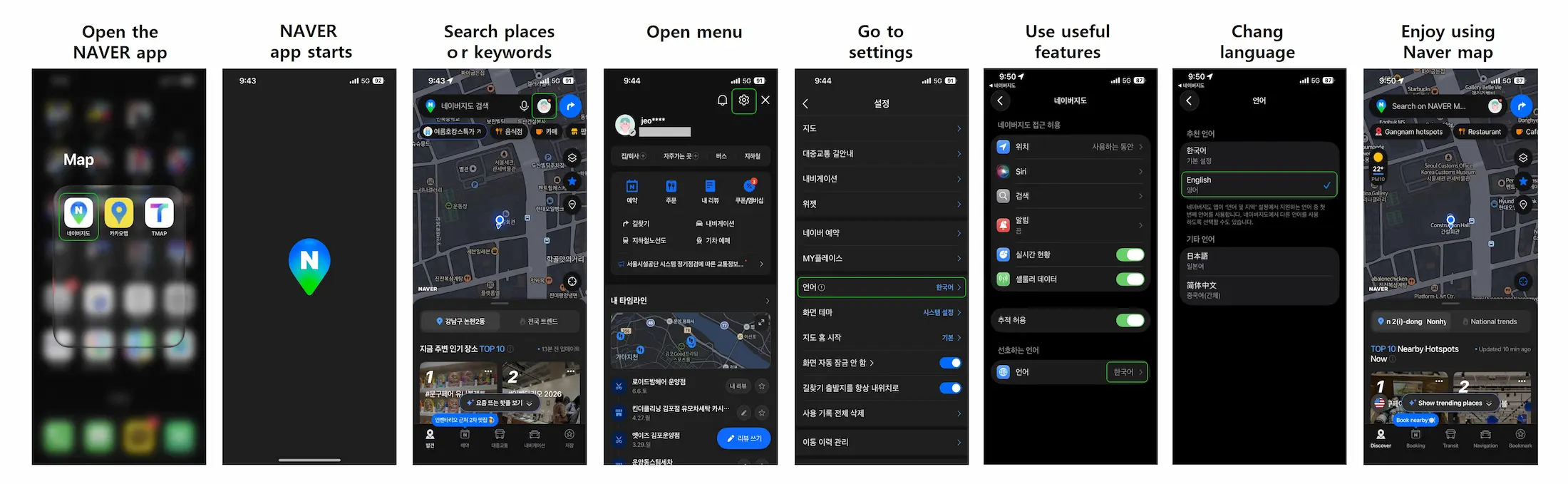
🌎 How to Change Naver Map to English
Most of the time, Naver Map automatically follows your phone’s language settings.
If it opens in Korean, you can manually switch it.
Steps:
⭐ Why Foreigners Love Naver Map
| Feature | Why It’s Helpful |
|---|---|
| 🚇 Advanced Subway Navigation | Shows the best train car, transfer locations, and exit numbers. |
| 🍜 Local Restaurant Reviews | Access thousands of reviews from Korean users and discover hidden gems. |
| 🏙️ Updated Street View | Preview hotels, cafés, restaurants, and attractions before you arrive. |
| 🚶 Excellent Walking Directions | More accurate and reliable than Google Maps in Korea. |
| 📍 Detailed Business Information | Find opening hours, photos, menus, and contact information. |
🚇 Advanced Subway Navigation
Naver Map doesn’t just tell you which subway line to take.
It also provides helpful details such as:
✔ Which train car to board
✔ Which door to stand near
✔ The fastest transfer routes
✔ The best exit numbers
These small details can save you a surprising amount of time and walking, especially in large stations like Seoul Station, Gangnam, and Jamsil.
🍜 Local Restaurant Reviews
Koreans rely heavily on Naver Reviews when choosing where to eat.
Unlike Google Reviews, many restaurants in Korea have hundreds or even thousands of local reviews, making it easier to:
✔ Avoid tourist traps
✔ Find popular local restaurants
✔ Discover hidden gems that many tourists miss
🏙️ Frequently Updated Street View
Naver’s Street View service is updated regularly, making it much easier to find places before you arrive.
It’s especially useful for locating:
✔ Cafés
✔ Hotels
✔ Restaurants
✔ Tourist attractions
Being able to see the entrance and surrounding area in advance can make navigating unfamiliar neighborhoods much less stressful.
💡 Local Tip: If you’re only going to install one map app during your trip to Korea, Naver Map is usually the best all-around choice for foreigners.
🚍 KakaoMap: Fast, Visual, and Tourist-Friendly
KakaoMap (카카오맵) is developed by Kakao, the company behind KakaoTalk, Korea’s most popular messaging app.
Since almost everyone in Korea uses KakaoTalk, KakaoMap has naturally become one of the country’s most widely used navigation apps.
Many travelers also prefer KakaoMap for its clean design, modern interface, and easy-to-read maps.
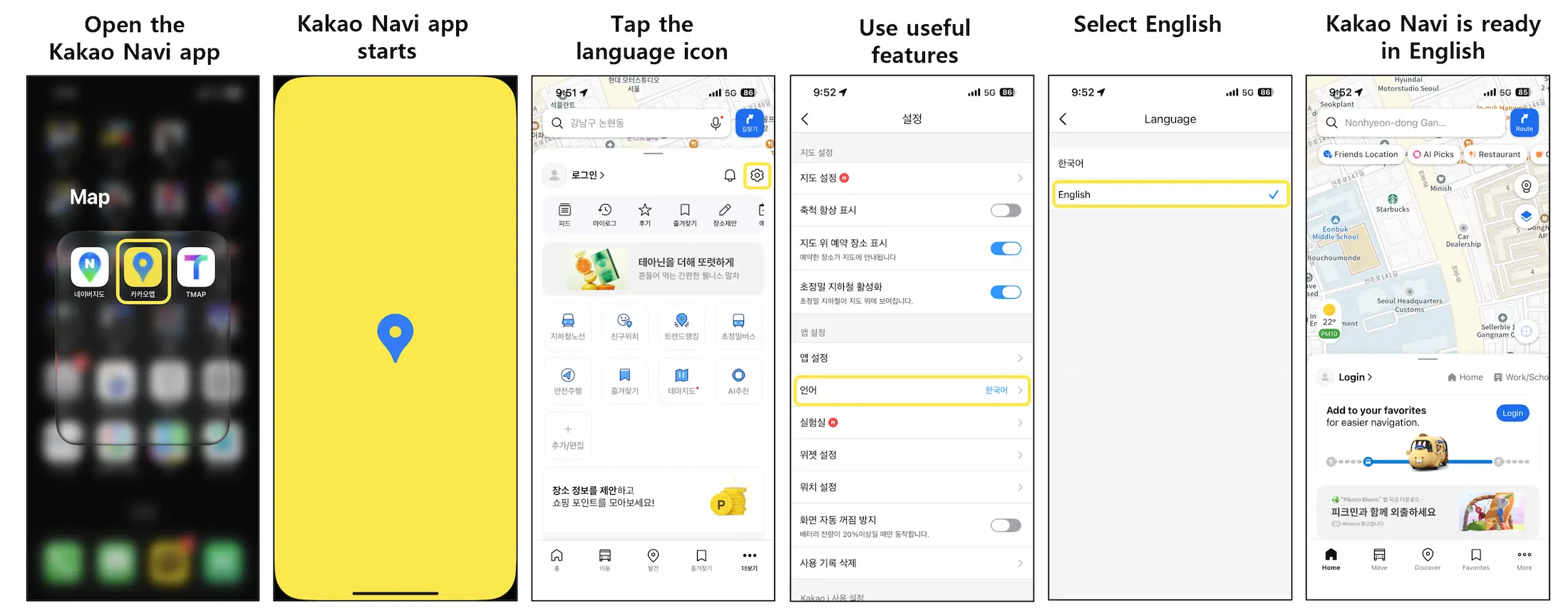
🌎 How to Change KakaoMap to English
Changing KakaoMap to English is simple.
Steps:
⭐ Why Foreigners Love KakaoMap
| Feature | Why It’s Helpful |
|---|---|
| 🚌 Real-Time Bus Tracking | Check bus locations, arrival times, and delays in real time. |
| 🌸 Seasonal Travel Layers | Discover cherry blossoms, autumn foliage, and local festivals. |
| 🏞️ Great for Exploring | Clean, visual maps make it easy to explore new neighborhoods. |
| 🗺️ Modern Interface | Simple design that’s easy for first-time visitors to navigate. |
| 📍 Regional Travel Information | Especially useful when traveling outside Seoul. |
🚌 Real-Time Bus Tracking
One of KakaoMap’s biggest strengths is its extremely accurate bus information.
You can quickly check:
✔ Bus arrival times
✔ Real-time bus locations
✔ Remaining stops
✔ Traffic delays
This feature is particularly useful when traveling outside Seoul, where buses are often the primary form of public transportation.
🌸 Seasonal Travel Layers
A unique feature of KakaoMap is its seasonal travel content.
Depending on the time of year, the app may highlight:
✔ Cherry blossom routes
✔ Autumn foliage spots
✔ Festival locations
✔ Special travel recommendations
These seasonal layers make it easier to discover places that many tourists might otherwise miss.
🏞️ Great for Exploring Neighborhoods
Many travelers find KakaoMap easier to browse visually than other navigation apps.
Its clean and modern map design makes it ideal for exploring popular areas such as:
✔ Hongdae
✔ Myeongdong
✔ Gangnam
✔ Seongsu
If you enjoy wandering through neighborhoods, finding cafés, and discovering hidden spots, KakaoMap is an excellent companion.
💡 Local Tip: Many Koreans use both Naver Map and KakaoMap. Naver Map is often preferred for detailed navigation, while KakaoMap is popular for bus information and visually exploring new places.
🚗 TMAP: The Best Driving Navigation App in Korea
If you’re planning to rent a car in Korea, downloading TMAP (티맵) is highly recommended.
With more than 20 million users, TMAP is the country’s most popular driving navigation app and is trusted by drivers across South Korea.
It offers:
✔ Real-time traffic analysis
✔ Accident and congestion alerts
✔ Speed camera warnings
✔ AI-powered route optimization
For driving in Korea, TMAP is generally considered the most accurate navigation app available.
⭐ Why Drivers Love TMAP
| Feature | Why It’s Helpful |
|---|---|
| 🚗 Highly Accurate Driving Routes | Optimized for Korean roads and real-time traffic conditions. |
| 🚨 Speed Camera Alerts | Provides warnings before speed cameras and enforcement zones. |
| 🛣️ Real-Time Traffic Information | Helps drivers avoid congestion and delays. |
| 📱 Apple CarPlay & Android Auto Support | Makes navigation much easier for foreign drivers. |
| ☎️ Phone Number Search | Find destinations instantly using a business phone number. |
⚠️ Does TMAP Support English?
Unfortunately, TMAP does not currently offer a complete English interface.
Most menus and settings still appear in Korean.
However, many foreign visitors continue to use TMAP because its driving directions are significantly more accurate than Google Maps in Korea.
📱 Use Apple CarPlay or Android Auto
One of the easiest ways to use TMAP as a foreign driver is by connecting your phone to your rental car.
Once connected:
✔ Maps appear on the dashboard screen
✔ Large navigation arrows make directions easy to follow
✔ Very little Korean reading is required
This makes driving in Korea much less intimidating, even if you don’t speak Korean.
☎️ Search by Phone Number
This is one of Korea’s best travel hacks.
Instead of entering a full address, many Koreans simply search by business phone number.
This works especially well for:
✔ Hotels
✔ Restaurants
✔ Tourist attractions
✔ Golf courses
✔ Shopping centers
The app will immediately pull up the correct destination.
🚨 Speed Camera Alerts
South Korea has a large number of speed cameras and traffic enforcement zones.
TMAP provides audio and visual warnings before:
✔ Fixed speed cameras
✔ Section control zones
✔ Traffic enforcement areas
These alerts can help drivers avoid unexpected speeding tickets and drive more confidently.
💡 Local Tip: If you’re planning a road trip or renting a car in places like Jeju Island, TMAP is usually the best navigation app to have on your phone. Even many locals who use Naver Map for everyday navigation switch to TMAP when driving.
📊 Which Korean Map App Should You Use?
| Feature | Naver Map | KakaoMap | TMAP |
|---|---|---|---|
| English Support | ✅ Full | ✅ Full | ❌ No |
| Walking Navigation | ⭐⭐⭐⭐⭐ | ⭐⭐⭐⭐ | ⭐ |
| Subway Routes | ⭐⭐⭐⭐⭐ | ⭐⭐⭐⭐ | ⭐ |
| Bus Tracking | ⭐⭐⭐⭐ | ⭐⭐⭐⭐⭐ | ⭐ |
| Restaurant Search | ⭐⭐⭐⭐⭐ | ⭐⭐⭐⭐ | ⭐ |
| Driving Navigation | ⭐⭐⭐ | ⭐⭐⭐ | ⭐⭐⭐⭐⭐ |
| Rental Cars | ⭐⭐ | ⭐⭐ | ⭐⭐⭐⭐⭐ |
💡 3 Insider Search Tricks Every Tourist Should Know
Even if you’re using the English version of Korean map apps, searches don’t always work perfectly.
Here are three simple tricks that locals use every day to find places more quickly and accurately.
| Trick | What to Do | Why It Works |
|---|---|---|
| 🇰🇷 Search in Korean | Copy and paste the Korean name of a place instead of the English name. | Korean place names usually return more accurate results. |
| ☎️ Search by Phone Number | Enter a business’s phone number instead of its address. | Many Korean apps recognize phone numbers instantly. |
| 🔍 Keep Searches Simple | Search for landmarks, station names, or business names instead of full addresses. | Short, simple searches often produce better results. |
🇰🇷 Search in Korean
Instead of searching for:
❌ Gyeongbokgung Palace
Try searching for:
✅ 경복궁
The results are usually much more accurate.
☎️ Search by Phone Number
Almost every business in Korea has a publicly listed phone number.
Searching by phone number often works better than searching by a full address, especially for:
✔ Hotels
✔ Restaurants
✔ Tourist attractions
✔ Golf courses
🔍 Keep Searches Simple
Instead of typing a long address like:
❌ 12 Itaewon-ro 27-gil, Yongsan-gu, Seoul
Try searching for:
✅ Itaewon Station
✅ Myeongdong Kyoja
Simple searches usually return better and faster results.
💡 Local Tip: If you can’t find a destination in English, try searching using the Korean name, phone number, or a nearby landmark. These three tricks solve most navigation problems that foreign visitors encounter in Korea.
☕ Why Naver Reviews Matter More Than Google Reviews
One of the biggest surprises for foreign visitors is that many Korean businesses pay far more attention to Naver than Google.
While Google Reviews are extremely important in countries like the United States, Canada, Australia, and much of Europe, South Korea works a little differently.
Many restaurants, cafés, beauty salons, hospitals, and local businesses actively manage their Naver Map listings while paying relatively little attention to their Google Business profiles.
As a result, relying only on Google Maps can sometimes lead to problems such as:
❌ A surprisingly low number of reviews
❌ Outdated business hours
❌ Missing menu information
❌ Old photos that no longer reflect the business
❌ Businesses that have moved or closed without being updated
On the other hand, Naver Map is heavily used by both consumers and business owners in Korea.
Many businesses regularly update their:
✔ Operating hours
✔ Menus and prices
✔ Photos
✔ Promotions and events
✔ Announcements and temporary closures
Because of this, Naver Map is often one of the most reliable sources for local business information in South Korea.
📊 Google Reviews vs. Naver Reviews
| Feature | Google Maps | Naver Map |
|---|---|---|
| Number of Local Reviews | Often limited | Usually much higher |
| Business Hours | Sometimes outdated | Frequently updated |
| Menus & Prices | May be missing | Commonly available |
| Photos | Can be outdated | Regularly updated |
| Popular Among Locals | Limited | Extremely popular |
Before visiting a restaurant, café, or tourist attraction, it’s often worth checking both Google Maps and Naver Map to get the most accurate and up-to-date information.rth checking both Google Maps and Naver Map to get the most accurate and up-to-date information.
💡 Pro Tip
A restaurant with only 20 Google reviews may have 5,000+ reviews on Naver Map.
❓ Frequently Asked Questions
1. Does Google Maps work in South Korea?
Yes, but its functionality is limited compared to other countries. You can still search for places, but walking directions, driving navigation, and some location data may be incomplete.
2. Which map app is best for foreigners in Korea?
For most travelers, Naver Map is the best all-around choice because it offers reliable walking directions, public transportation information, and extensive local business listings.
3. Should I download both Naver Map and KakaoMap?
Yes. Many locals use more than one navigation app depending on the situation. Using both apps can make traveling around Korea much easier.
4. Why can’t I find some places in English?
Some businesses and attractions are listed primarily under their Korean names. If an English search doesn’t work, try searching in Korean or using a nearby landmark.
5. Do I need TMAP if I’m not driving?
No. TMAP is mainly designed for drivers and rental cars. If you’re using public transportation or walking, Naver Map and KakaoMap are usually all you need.
🎯 Final Thoughts
At first, navigating South Korea without fully relying on Google Maps might seem a little inconvenient.
But once you start using Korea’s local navigation apps, you’ll quickly realize that getting around the country is easier than you might expect.
From finding hidden restaurants and navigating busy subway stations to planning road trips and exploring new neighborhoods, these apps make everyday travel smooth, convenient, and surprisingly efficient.
The biggest takeaway is simple: download the right apps before your trip and don’t depend solely on Google Maps.
With a little preparation, you’ll be able to explore South Korea with confidence and enjoy everything the country has to offer.
Have a wonderful trip, and enjoy discovering Korea like a local! 🇰🇷✈️
📚 Related Korea Living Guides
New to Korea? These guides will help you settle in faster :
How to Use Kakao Taxi in Korea: A Guide for Foreigners
WOWPASS vs NAMANE Card
Climate Card vs T-Money in 2026
8 Essential Apps Every Foreigner Needs in Korea